
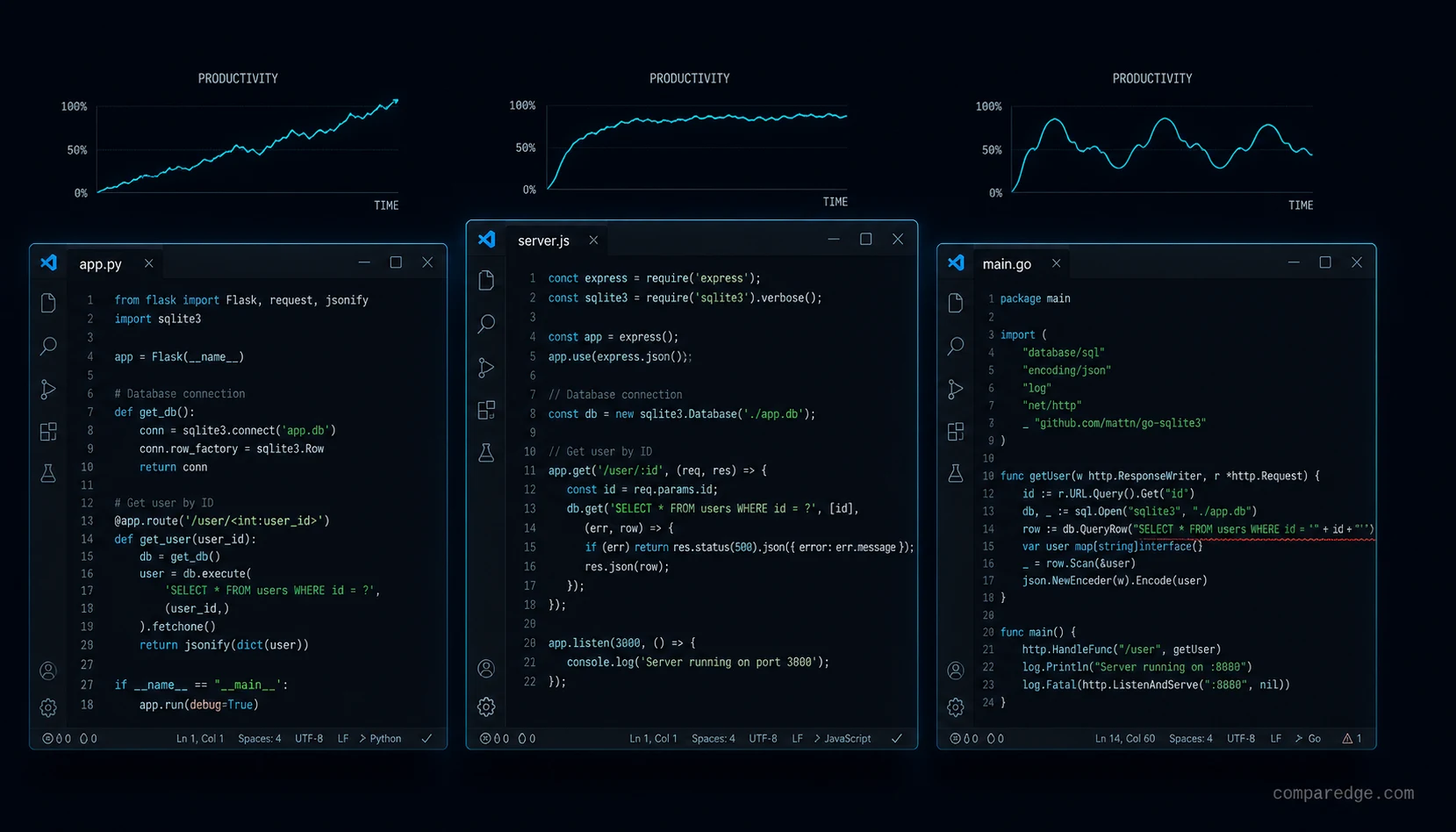
Are AI coding tools making us faster or just busier?
The pitch is irresistible: 40-55% productivity gains, faster onboarding, fewer context switches. Every vendor has a study showing engineers complete tasks faster with AI assistance. And the studies are probably right - for the specific tasks they measured, under the specific conditions they tested.
TL;DR:
- GitClear's 2024 analysis found code churn increased 39% after AI coding tool adoption across thousands of repositories.
- Cursor uses full-codebase embedding retrieval; Windsurf's Cascade maintains a persistent cross-session context model.
- Treat AI-generated code as untrusted input: run SAST/DAST on every change and require security review in sensitive areas.
The question nobody wants to ask is whether completing individual tasks faster translates to shipping better software faster. Because the data from production codebases tells a more complicated story than the vendor benchmarks suggest.
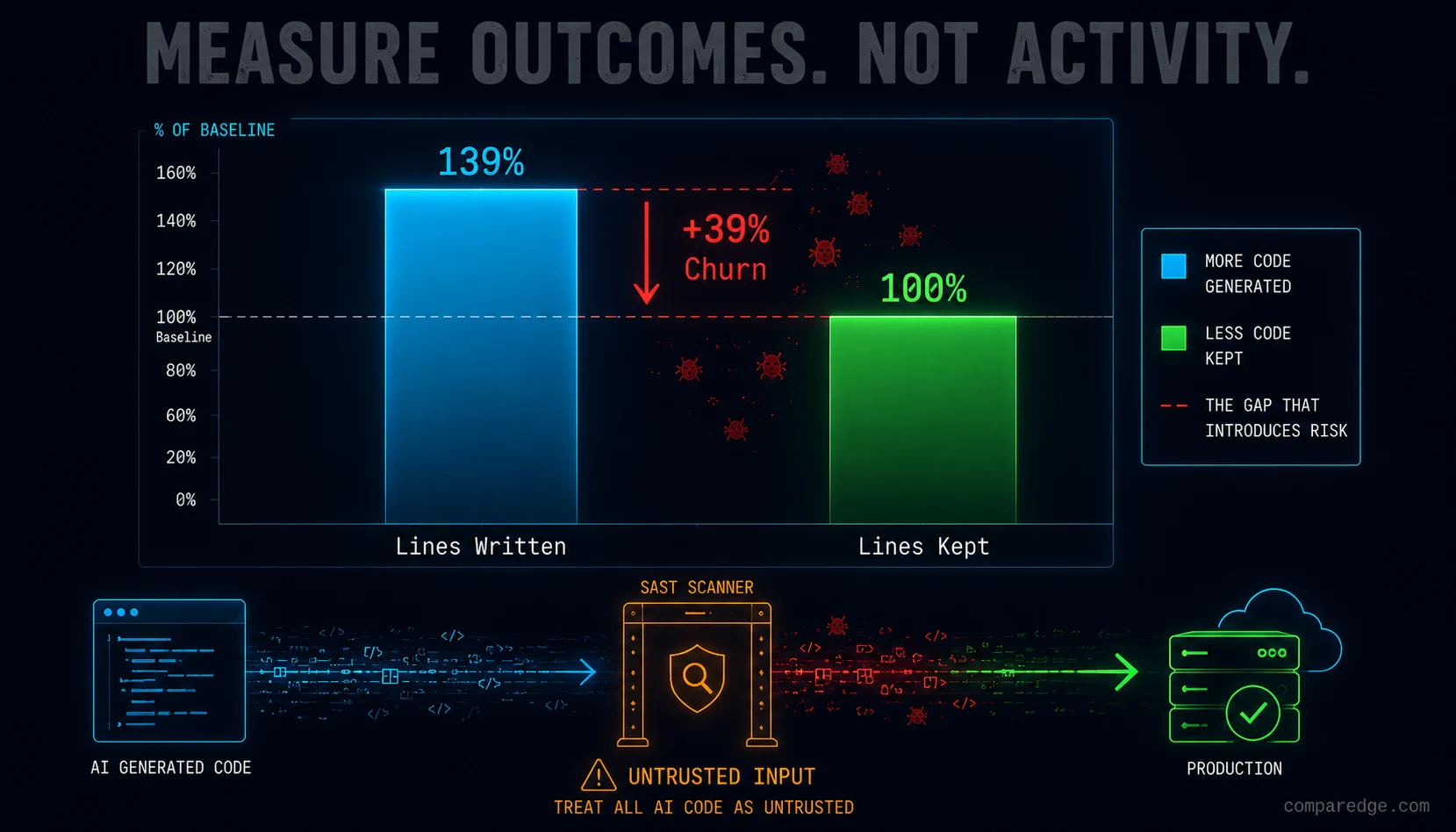
GitClear's 2024 analysis of millions of lines of code across thousands of repositories found that code churn - code that is written and then revised or deleted within two weeks - increased by 39% after AI coding tool adoption. Engineers were writing more code, faster. They were also rewriting more of that code, faster. The net effect on meaningful output is far murkier than "55% productivity gain" implies.
This does not mean AI coding tools are useless. It means understanding the mechanics of how they work is essential for extracting real value instead of inflated metrics.
How does RAG in an IDE actually work?
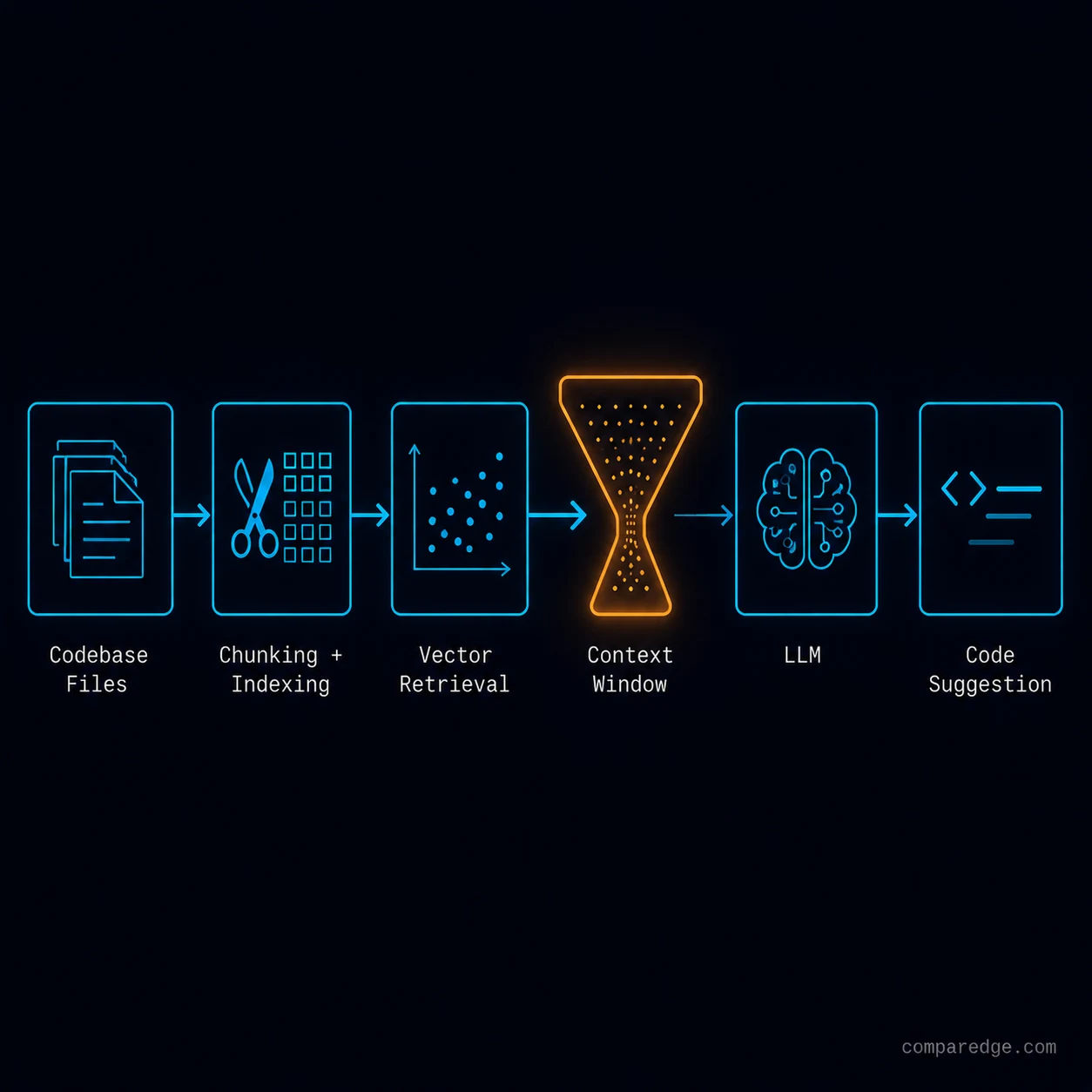
Every AI coding tool faces the same fundamental constraint: the language model's context window is finite, but your codebase is not. The way each tool handles this constraint determines its effectiveness, and the differences are more significant than most evaluations acknowledge.
The basic mechanic is Retrieval-Augmented Generation applied to code. When you ask the AI to write or modify code, the tool needs to provide relevant context from your codebase. Which files are relevant? Which functions? Which type definitions? The model cannot read your entire repository - even with 200K token context windows, a medium-sized codebase exceeds that limit by an order of magnitude.
GitHub Copilot uses a relatively simple approach. It primarily uses the open file and recently opened files as context, augmented by the repository structure. For inline completions, context is drawn from the current file and a few neighboring files. The approach is fast but shallow - Copilot often misses relevant context in files you have not recently opened.
Cursor takes a more aggressive approach to context. It builds a codebase index using embeddings and provides retrieval across the entire project. When you ask a question or request a change, Cursor retrieves relevant code chunks from anywhere in the codebase, not just open files. It also allows explicit context pinning with @-mentions of specific files, functions, or documentation.
Windsurf (formerly Codeium's editor product) differentiates through what it calls "Cascade" - an agentic system that maintains a persistent understanding of your codebase and development patterns. Rather than retrieving context per-request, Cascade builds a running model of your project structure, dependency relationships, and code patterns.
The practical difference matters most for large codebases. On a 500-file project, all three tools provide roughly similar results because the context retrieval problem is tractable. On a 5,000-file monorepo with complex internal dependencies, the quality gap widens significantly.
What do real benchmarks actually show?
Vendor benchmarks measure task completion time on isolated coding tasks. Write a function, fix a bug, implement a feature from a specification. In these controlled conditions, AI tools show genuine speedups.
But GitClear's production data tells a different story about sustained impact. After the initial adoption period, repositories using AI coding tools showed:
- 39% increase in code churn (code written and then changed within 14 days)
- 17% decrease in code moving (refactoring existing code rather than writing new code)
- Increase in "copy/paste" patterns where similar code appears in multiple locations rather than being abstracted
These patterns suggest that AI tools make it easier to write new code but do not help with the harder engineering work: refactoring, abstraction, and maintaining consistency across a codebase.
The honest assessment: AI coding tools provide a 15-25% net productivity improvement for most engineering teams, with high variance depending on the type of work. Greenfield development benefits most. Maintenance of complex legacy systems benefits least.
What are the architectural differences between Cursor and Windsurf?
Cursor is built as a VS Code fork with deep modifications to the editor core. It intercepts the editor's file system operations, language server protocol messages, and terminal output to build a comprehensive context model. The indexing runs locally, with optional cloud-based embedding computation.
Windsurf started as Codeium - a completion engine - and evolved into a full editor. Its architecture centers on the Cascade agent system, which maintains a persistent session across your development work. Rather than treating each AI interaction as independent, Cascade tracks what you are working on, what changes you have made, and what your apparent intent is.
The practical difference: Cursor gives you more explicit control over context (you choose what to include), while Windsurf attempts to handle context automatically. For engineers who think precisely about what context the AI needs, Cursor's approach yields better results. For engineers who want to minimize the overhead of AI interaction, Windsurf's automated approach is more efficient.
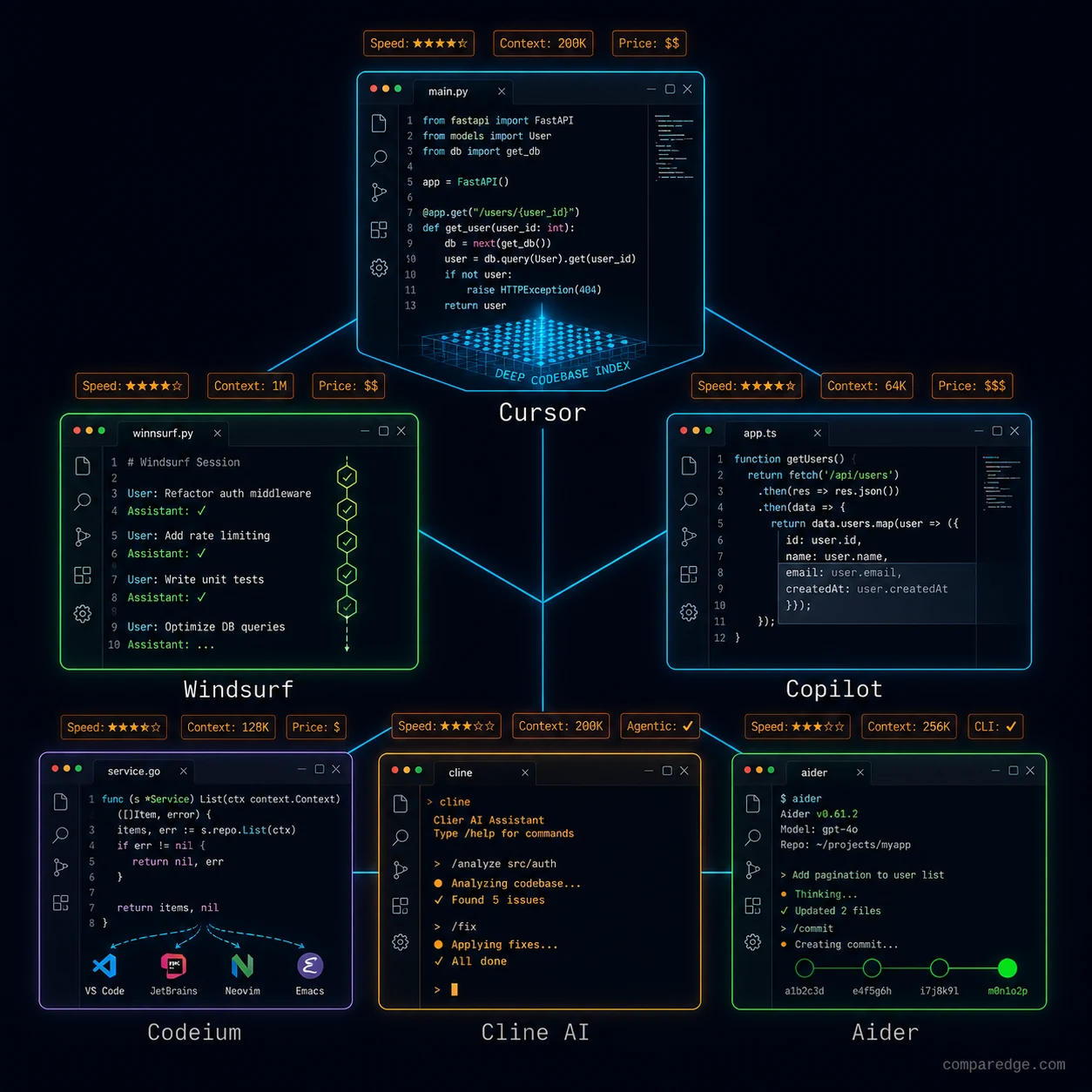
| Tool | What it does | Complexity | Main weakness |
|---|---|---|---|
| Cursor | VS Code fork with deep codebase indexing, multi-model support | Medium | Subscription cost, index build time on large repos |
| Windsurf | Full editor with persistent Cascade agent, automated context | Medium | Less explicit control over context, newer platform |
| GitHub Copilot | Inline completions, chat, VS Code/JetBrains integration | Low | Shallow context, limited cross-file understanding |
| Codeium | Free tier, completions and chat, multi-IDE support | Low | Less sophisticated retrieval than Cursor/Windsurf |
| Cline AI | Open-source agentic coding, local/cloud model support | High | Requires configuration, variable quality by model |
| Aider | Terminal-based agentic coding, git-native workflow | High | CLI-only, steep learning curve for non-terminal users |
Who is responsible when AI introduces vulnerabilities?
Agentic coding - where the AI tool makes changes across multiple files, runs tests, and iterates on failures autonomously - raises a question that most organizations have not answered: who is responsible for security vulnerabilities introduced by AI-generated code?
The mechanics of the problem: an AI tool generates code that includes a SQL injection vulnerability. The code passes automated tests because the tests do not include security-focused test cases. A human engineer reviews the pull request and approves it - the vulnerability is subtle, embedded in a larger change, and the engineer is reviewing for functionality, not security.
Current legal and organizational frameworks do not have clear answers. What is clear is that AI-generated code is not inherently more or less secure than human-written code, but it is produced at higher volume and reviewed with the same (or less) rigor.
The responsible approach: treat AI-generated code as untrusted input. Run SAST and DAST tools on every change. Require security-focused review for AI-generated changes in sensitive areas (authentication, authorization, data handling, API endpoints).
When do AI coding tools make things worse?
The anti-case that vendors never mention: legacy codebases over 10 years old.
AI coding tools are trained predominantly on modern code patterns. They understand current framework conventions, popular library APIs, and contemporary coding styles. When applied to a legacy codebase with custom frameworks, deprecated dependencies, and idiosyncratic patterns, the tools generate code that is technically correct by modern standards but fundamentally wrong for the codebase.
The specific failure mode: the AI suggests using a modern library API that was not available when the codebase was written, conflicting with the version pinned in the dependency file. Or it generates code that follows modern patterns (async/await) in a codebase that uses callback patterns throughout, creating inconsistency that future maintainers must navigate.
For teams working on legacy systems, the calculus is different. AI tools help with isolated tasks - writing tests, generating boilerplate, translating between formats. They hurt with systemic tasks that require understanding the codebase's history and constraints.
What if AI introduced SQL injection in 47 files that passed code review?
Consider this scenario. A team of 12 engineers adopts an agentic coding tool for a major feature build. Over three weeks, the tool generates or modifies code in 200 files across the application. The changes go through standard code review, where reviewers focus on functionality and architectural consistency.
In 47 of those files, the AI-generated code constructs database queries using string concatenation instead of parameterized queries. The vulnerability is subtle - the AI included parameterized queries in some files but not others, so reviewers who saw the correct pattern in early reviews assumed it was consistent throughout.
The feature ships. Two months later, a penetration test identifies the vulnerability. Fixing 47 files requires coordinated changes across the codebase, regression testing, and an emergency release. The direct cost is approximately $300K in engineering time and testing.
The root cause was not the AI tool. It was the assumption that code review at a constant velocity is sufficient when code production velocity has increased 3x. The team's review capacity did not scale with the AI's production capacity, creating a quality gap that was invisible until exploitation.
What should CTOs and Engineering Managers measure?
The CTO needs to measure outcomes, not activity. Lines of code generated per day is meaningless. The metrics that matter:
Time from feature specification to production deployment. If AI tools reduce this, they are working. If they do not, the productivity gains are being consumed by rework.
Defect escape rate - the number of bugs that reach production per release. If this increases after AI adoption, the review process needs to adapt.
The Engineering Manager needs to redesign the review process for an AI-augmented workflow. This means smaller PRs, mandatory security linting for AI-generated code, and adjusted reviewer expectations that explicitly account for AI-generated content.
The IC engineer needs to treat AI tools as a force multiplier for their judgment, not a replacement for it. Accept suggestions critically. Understand what the tool generated and why. Maintain the ability to write the code without AI assistance, because the AI will fail on the hard problems.
Compare AI Coding Tools
Before adopting one of these tools, compare pricing, IDE support, and real user ratings:
- Cursor vs GitHub Copilot - Deep codebase indexing vs inline completions
- Cursor vs Windsurf - VS Code fork vs Cascade agent architecture
- Browse all AI coding tools and assistants on ComparEdge
Pricing ranges from free (Codeium, GitHub Copilot free tier) to $20-40/month for power users. Enterprise plans start at $19/user/month for Copilot Business.
Find the best tool for your use case: real pricing, user ratings, and feature comparisons for 495++ products.
Browse All Categories