
The number on the pricing page is not the price you will pay
It never is. Not for enterprise SaaS, not for mid-market tools, and increasingly not for SMB software that has discovered the revenue potential of add-ons, seat-based overages, and API throttling.
The gap between the published subscription price and the actual annual cost of a B2B software product averages 47% according to procurement data aggregated from mid-market buyers in 2025. For tools requiring professional services, that figure climbs above 80%. For some ERP and ITSM deployments, the subscription fee is the smallest line item on the invoice.
This guide is the complete True Cost Framework: a structured method for calculating what software actually costs before you sign, before you negotiate, and before you go live.
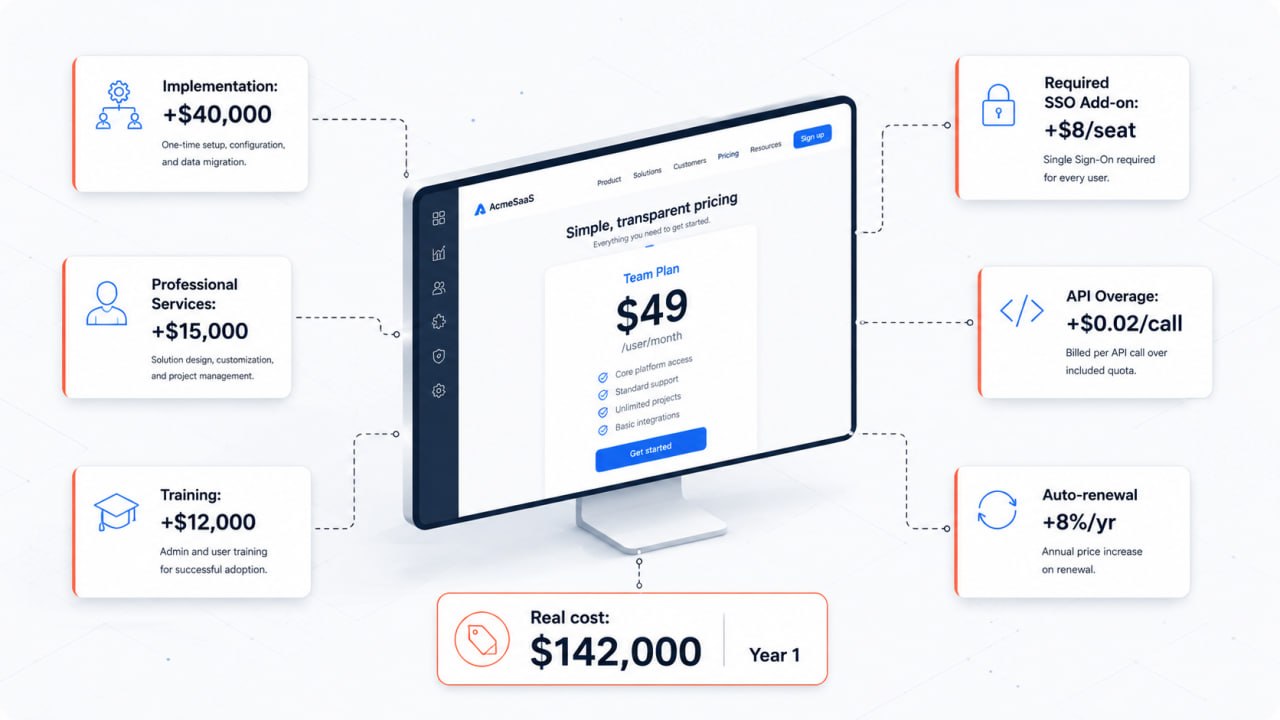 A $49/seat plan becomes $142,000 in Year 1 once implementation, training, required add-ons, and API overages are included.
What the True Cost Framework covers
The framework breaks total cost of ownership into six components. Each one is real, measurable, and routinely omitted from vendor pricing pages.
- License and subscription fees
- Implementation and professional services
- Training and enablement
- Premium support tiers
- Required add-ons and feature gates
- Integration and API costs
We will cover each in depth, with benchmark figures, questions to ask vendors, and red flags that signal a product that monetizes through obfuscation rather than value.
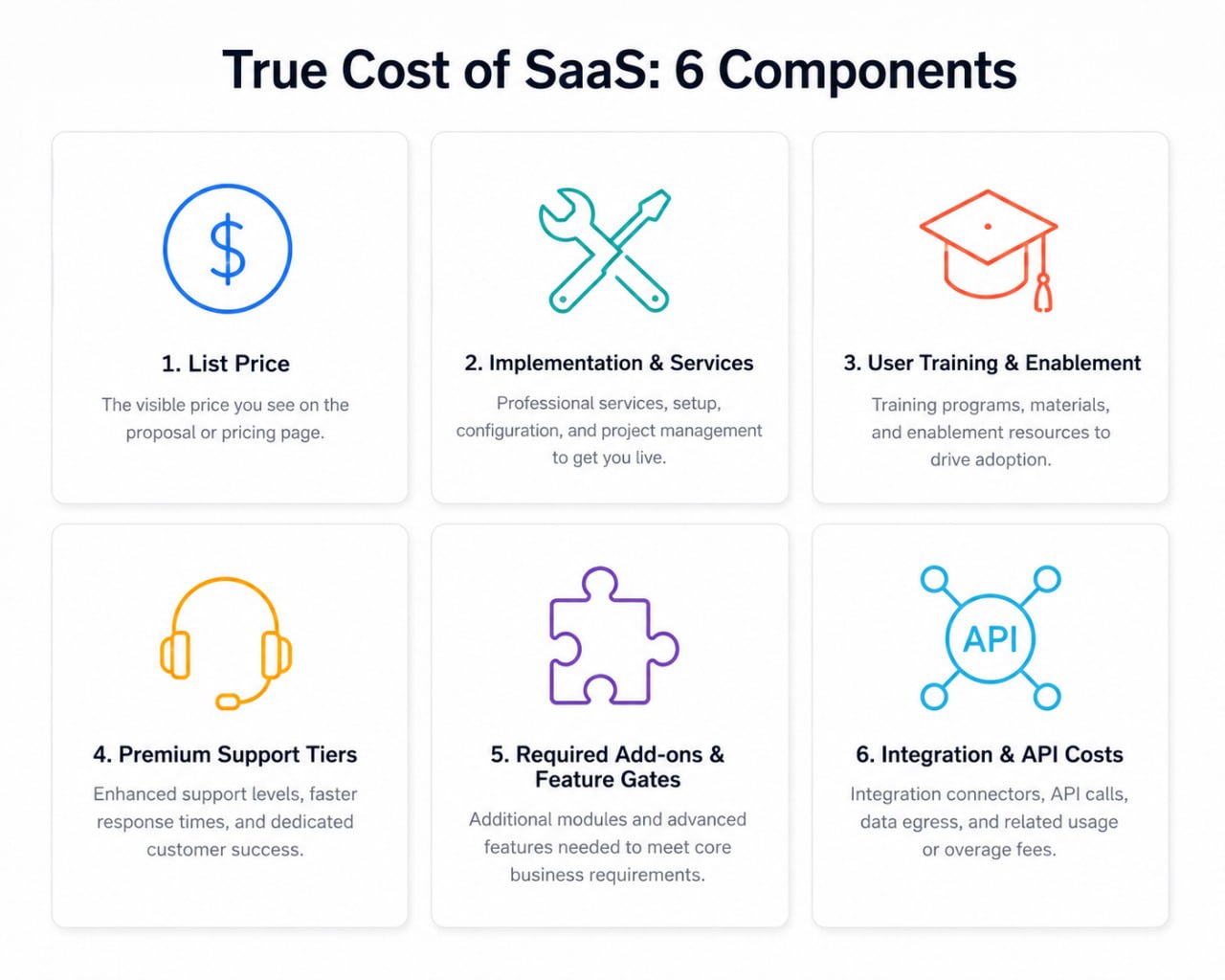 The six components that determine total cost of ownership for any B2B SaaS product.
Component 1: License and subscription fees
The base subscription is the only cost most buyers evaluate rigorously. Everything else is treated as vague or negotiable during procurement. This is a mistake, but let us start here.
Pricing model anatomy
Modern SaaS pricing comes in five structural models, and each creates a different risk profile for cost overruns:
Per-seat pricing charges per named or concurrent user. It is the most common model in CRM, project management, and HR software. The risk: seat counts grow. A 50-seat license that expands to 75 during the contract period typically triggers either a true-up invoice or a per-seat overage charge, often calculated at the list rate rather than the negotiated rate.
Usage-based pricing bills by consumption: API calls, data processed, records stored, emails sent, minutes of compute. It is standard in LLM APIs, data platforms, and cloud infrastructure. The risk: usage is hard to forecast. A development team that ships a new feature using an AI API can generate more charges in a week than the rest of the year combined.
Flat-rate pricing offers unlimited usage for a fixed monthly or annual fee. It looks simple. The complexity sits in the feature tiers: flat-rate pricing almost always stratifies by feature access, not user count, meaning what you actually need may require a higher tier.
Module-based pricing charges separately for each functional area. ERP vendors have used this model for decades. You license the HR module, the finance module, the procurement module. Each new workflow requires a new line item. The core platform price is the floor, not the ceiling.
Hybrid models combine two or more of the above. A CRM might charge per seat for users plus a usage fee for email sends plus add-on pricing for AI features. These are the hardest to forecast and the easiest for vendors to use as a revenue lever.
Negotiation leverage points on base pricing
Annual prepay discounts typically range from 10 to 20 percent over monthly billing. Most vendors do not advertise this; they wait for the buyer to ask.
Multi-year commitments unlock deeper discounts: 15 to 35 percent for two or three year terms. The risk is locking in before you have validated fit at scale.
Volume tiers create thresholds where per-unit cost drops. If your current usage sits at 48 seats and the next tier starts at 50, ask the vendor to price you into the higher tier. The cost difference may be trivial for them and meaningful for you.
Renewal timing is leverage. Vendors discount most aggressively in the 30 to 60 days before your renewal date, when the cost of losing the account becomes concrete. Starting negotiations 90 days before renewal signals preparation; starting them at day 60 signals urgency.
Component 2: Implementation and professional services
Implementation costs are the most consistent source of buyer surprise in enterprise software. They are also the most variable, which is why vendors resist publishing them.
What implementation actually costs
For SMB tools with solid onboarding documentation, implementation is often self-serve and costs nothing except internal time. For mid-market and enterprise products, expect the following ranges:
CRM platforms (Salesforce, HubSpot, Dynamics): Implementation for a 50-seat CRM deployment with standard integrations typically runs $15,000 to $80,000 in professional services. Salesforce implementations for organizations above 200 seats regularly exceed $200,000 before customization.
ERP systems (SAP, Oracle NetSuite, Microsoft Dynamics): ERP implementations are in a different category entirely. A mid-market ERP deployment for a company with $50M in revenue should be budgeted at 100 to 200 percent of the first-year license cost. A $120,000 annual NetSuite license may require $150,000 to $300,000 in implementation services.
Security platforms (IAM, SIEM, CNAPP): Identity and access management implementations for organizations with 1,000 or more identities typically require 60 to 120 days of engineering work. At blended professional services rates of $200 to $350 per hour, that is $90,000 to $250,000 before internal labor.
AI and LLM platforms: Embedding a production LLM into an existing workflow requires prompt engineering, evaluation frameworks, output validation, and often retrieval-augmented generation infrastructure. Vendor professional services for AI integration range from $20,000 for lightweight use cases to over $150,000 for multi-model, multi-pipeline deployments.
The data migration variable
Every software replacement involves data migration. Every data migration takes longer and costs more than estimated. Budget separately, and build in a 40 percent contingency.
Common migration costs that are omitted from vendor proposals:
- Data cleaning and normalization before import
- Custom field mapping when schema differs between old and new system
- Historical data validation after migration
- Parallel operation period where both systems run simultaneously
- Rollback planning if migration fails
Vendors typically provide migration tools that work well for standard data formats. Custom schemas, legacy databases, and proprietary export formats require additional engineering.
Questions to ask before signing
Ask every vendor: "What is the typical implementation cost for a company of our size and complexity?" If they cannot answer with a range, that is a red flag. If they answer with "it varies," push for the variance: what is the low end, what is the high end, what determines the difference.
Ask for three customer references in your size band who have recently completed implementation. Ask those references what implementation actually cost, not what was quoted.
Component 3: Training and enablement
Training is the most consistently underbudgeted component of SaaS total cost of ownership. Buyers allocate budget for the software. They treat training as something that happens organically. It does not.
The adoption failure mode
Industry data from SaaS vendor post-implementation studies consistently shows that 25 to 40 percent of software licenses go largely unused within the first year. The primary cause is not product quality: it is inadequate enablement. Employees continue using spreadsheets, email, or legacy systems because the new tool was not sufficiently embedded into their workflow.
Unused licenses are not cost savings. They represent the full cost of the subscription applied to zero business value.
Training cost components
Vendor-delivered training is available in multiple forms. Self-paced online courses are usually included in the subscription or available at low cost. Instructor-led training, both virtual and in-person, is charged separately and typically runs $1,500 to $5,000 per day per instructor. Certification programs for admins and power users can add $500 to $2,000 per person.
Internal enablement cost is the cost that almost no one calculates: the time your employees spend in training rather than doing their jobs. A 50-person team each spending four hours in onboarding represents 200 hours of lost productivity. At an average fully-loaded cost of $75 per hour, that is $15,000 in internal cost before a single person opens the product.
Change management is required for any software that significantly alters how work gets done. For CRM, ERP, and ITSM implementations, professional change management consulting costs $10,000 to $50,000 for mid-market deployments. Organizations that skip this step see adoption rates 30 to 50 percent lower than organizations that invest in it.
Documentation and internal knowledge base creation requires time from someone who understands both the product and your internal processes. Budget 40 to 80 hours for initial documentation of a reasonably complex tool.
Ongoing training costs
Software does not stay static. Features change, interfaces evolve, new capabilities are added. Budget for recurring training:
- Quarterly product update sessions for power users
- Onboarding sessions for new hires, particularly in high-turnover roles
- Refresher training when adoption metrics indicate drift
A reasonable ongoing training budget is 10 to 15 percent of the initial training investment per year.
Component 4: Premium support tiers
Standard support included in base subscriptions has gotten worse as SaaS markets have matured. Vendors have discovered that support quality is a product line, not a service obligation.
What standard support actually means
For most SaaS products, the standard tier includes email support with response times measured in business days, access to a knowledge base, and community forums. For non-critical tools, this is often adequate.
For tools that sit in critical paths, standard support creates unacceptable risk. A billing system that goes down on the last day of the quarter, an authentication platform that blocks employee access on Monday morning, or a data pipeline that fails during a regulatory reporting window are not situations where a 48-hour email response is acceptable.
Support tier economics
Premium support pricing varies significantly by vendor:
CRM and project management tools typically offer priority support tiers at $1,000 to $8,000 per year. These include faster response times (hours rather than days), dedicated support contacts, and sometimes guaranteed uptime SLAs with financial penalties for violations.
Security and compliance platforms charge more aggressively for support because the stakes are higher. A 24/7 SOC-level support tier from a leading SIEM vendor can cost $15,000 to $40,000 annually on top of the license fee.
ERP and business-critical infrastructure support is typically structured as a percentage of license cost: 18 to 22 percent of annual license fees for standard support, with premium tiers at 25 to 30 percent. On a $200,000 ERP license, that is $36,000 to $60,000 in annual support costs before any premium add-ons.
Dedicated customer success managers are offered at enterprise tiers or as a paid add-on. Pricing ranges from $12,000 to $60,000 per year depending on the vendor and the level of engagement. The value varies significantly by CSM quality and vendor.
When to buy premium support
Buy premium support when:
- The tool is in a revenue-critical or compliance-critical path
- Downtime has a calculable cost per hour that exceeds the annual support premium
- Your internal team lacks the expertise to diagnose complex issues without vendor assistance
- You are in a regulated industry where response time commitments may be required by auditors
Do not buy premium support when:
- The tool is used by fewer than 20 people for non-critical workflows
- You have internal expertise sufficient to handle common issues
- The vendor's standard support, based on reference checks, is actually responsive
Component 5: Required add-ons and feature gates
This component represents the most aggressive evolution in SaaS monetization over the past five years. Vendors have learned to ship a functional but deliberately limited base product, then sell the features that make it genuinely useful as separate line items.
Common feature gate patterns
AI features are the current frontier of add-on monetization. CRM vendors charge separately for AI-powered forecasting. Project management tools gate AI task generation behind premium tiers. Email marketing platforms charge for AI subject line optimization. The AI features are not experimental: they are core to the product value proposition and priced as luxury add-ons.
Analytics and reporting are gated in tools where data insights are central to the value. A project management tool might include basic dashboards in the base tier and lock portfolio-level reporting, time tracking analytics, and capacity planning behind a higher tier or separate add-on.
Automation and workflow capabilities follow the same pattern. The base product lets you do the work manually. The add-on lets you automate it. For high-volume operations, the automation is not optional: it is why you bought the product.
Storage and data retention limits are used by document management, collaboration, and data platforms to create upgrade pressure. A team that accumulates data over two years may find themselves compelled to upgrade purely to retain access to their own historical records.
Security features including SSO, SAML, advanced audit logs, and role-based access controls are routinely gated behind enterprise tiers in tools that serve mid-market buyers. For organizations with compliance requirements, these features are not optional. Vendors know this.
API access is rate-limited or paywalled in ways that are not apparent until you build integrations. A product with a generous-seeming API allowance in its standard documentation may have rate limits that make production use impractical without a higher tier.
Identifying required add-ons before purchase
The only reliable method is direct questioning of the vendor, supplemented by reference calls with existing customers.
Ask the vendor: "Given our use case as I have described it, what add-ons will we need to achieve the full workflow?" Document the answer in writing. If the vendor is reluctant to answer specifically, that reluctance is itself information.
Ask reference customers: "What additional products or features did you end up needing to buy that were not part of your initial purchase?" This question consistently surfaces the add-ons that vendors underemphasize during the sales process.
Review the vendor's changelog for the past 12 months. Features that were recently moved behind a higher tier or converted from included to paid are a signal of the vendor's monetization trajectory.
Calculating required add-on cost
Once you have identified required add-ons, calculate their cost as a percentage of the base subscription. If add-ons add more than 30 percent to the base price, document this explicitly in your internal business case. Surprises at renewal are harder to manage than surprises during initial procurement.
Component 6: Integration and API costs
Modern software does not work in isolation. Every tool you buy must connect to some other tool you already have. Integration costs are the most technically complex component of total cost of ownership and the one most frequently underestimated by non-technical buyers.
Integration cost categories
Native integrations are pre-built connections the vendor maintains. They are typically the lowest cost option: included in the subscription or available at low add-on cost. The limitation is that native integrations only cover popular tools and may not support the specific data flows your use case requires.
Integration platform costs arise when native integrations are insufficient. Middleware tools such as Zapier, Make, Workato, and Boomi charge based on tasks executed, users, or data volume. A mid-complexity integration running 50,000 tasks per month on Zapier costs approximately $1,200 per year. An enterprise-grade integration on Workato for a complex ERP-to-CRM data pipeline can cost $24,000 to $80,000 annually.
Custom development is required when neither native integrations nor middleware platforms can accommodate the necessary data flow. Custom API integrations developed by internal engineers or external contractors cost $10,000 to $100,000 per integration depending on complexity. They also create ongoing maintenance obligations as both systems evolve.
API overage costs are charged by platforms with usage-based API pricing when consumption exceeds the included limit. These charges are particularly common with AI APIs, data enrichment services, and communications platforms. Overages are typically charged at list rate rather than the negotiated rate, and they compound rapidly if not monitored.
Webhook infrastructure costs arise when you build automated workflows that listen for events from one system and trigger actions in another. At small scale, this is negligible. At large scale, the infrastructure to reliably process, deduplicate, and handle webhook failures requires engineering investment.
The hidden cost of integration maintenance
An integration built today is not finished today. It requires maintenance when:
- Either connected system releases a breaking API change
- Data schemas evolve on either side
- The integration platform itself changes its pricing or deprecates features
- Usage patterns change and the integration needs optimization
Budget 20 percent of integration development cost per year for maintenance. For a $50,000 custom integration, that is $10,000 per year in ongoing engineering cost.
Building your own TCO model
The six components above are universal. Your specific TCO calculation requires mapping each component to your organization's situation.
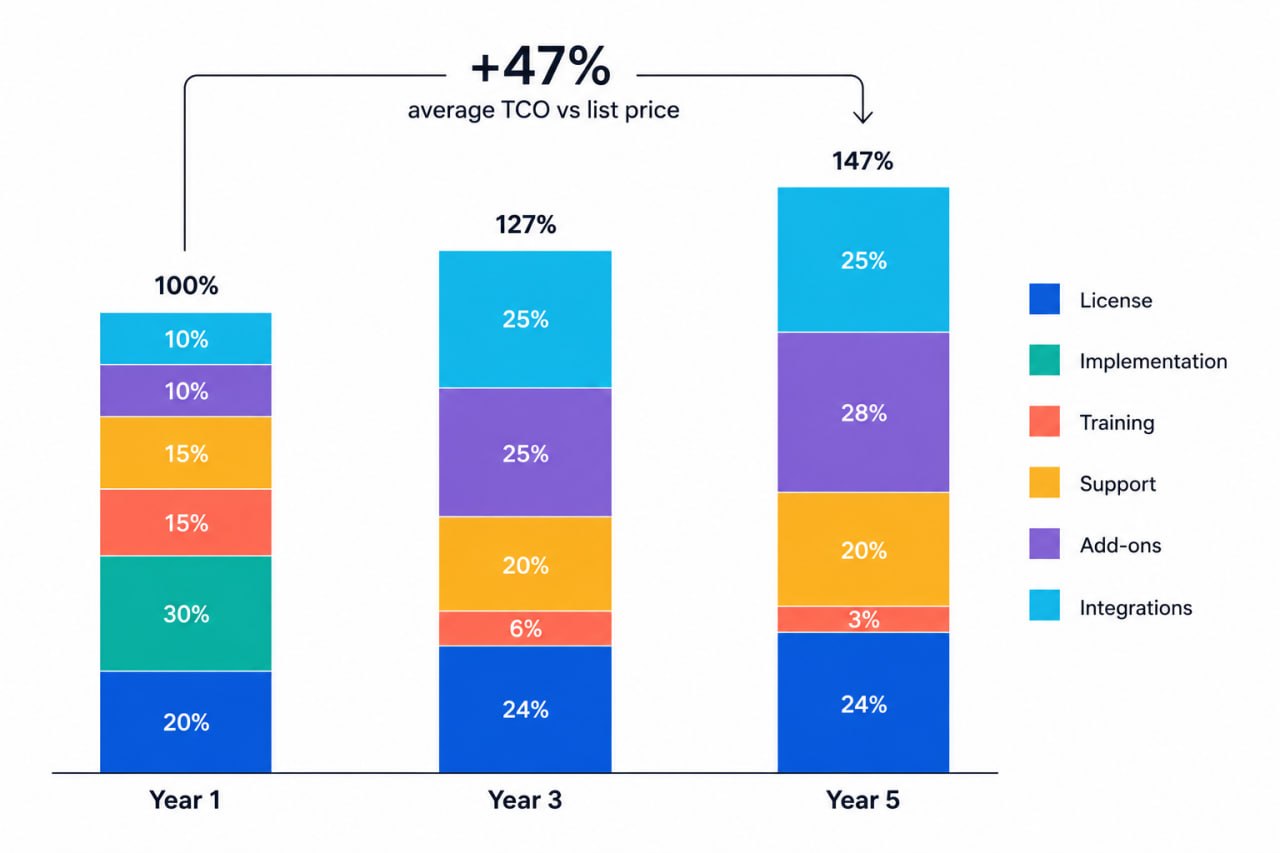 Average TCO grows from 100% to 147% of list price by Year 5 as add-ons, support tiers, and renewals compound.
The TCO calculation template
Year 1 cost:
| Component | Estimated Cost | Source |
|---|---|---|
| Base subscription | $X | Vendor quote |
| Implementation services | $X | Vendor proposal / benchmark |
| Data migration | $X | IT assessment |
| Internal implementation labor | $X | Hours x loaded cost |
| Training (vendor) | $X | Vendor quote |
| Training (internal time) | $X | Hours x loaded cost |
| Required add-ons | $X | Feature audit |
| Integrations (build) | $X | Engineering estimate |
| Integration platform fees | $X | Platform pricing |
| Year 1 Total |
Ongoing annual cost (Year 2+):
| Component | Estimated Cost | Source |
|---|---|---|
| Subscription (with renewal increase) | $X | Contract terms |
| Premium support | $X | Support tier pricing |
| Required add-ons | $X | Feature audit |
| Integration maintenance | $X | 20% of build cost |
| Training (ongoing) | $X | 10-15% of initial |
| Annual Ongoing Total |
5-year TCO:
Take Year 1 total, add four times the annual ongoing cost, and factor in 5 to 10 percent annual price escalation. Most enterprise SaaS contracts include automatic renewal price increases of 3 to 8 percent. Some are higher and are buried in contract terms.
Category-specific TCO benchmarks
CRM (50 seats, mid-market):
- Base subscription: $30,000 to $60,000
- Implementation: $20,000 to $50,000
- Training: $8,000 to $15,000
- Required add-ons (AI, analytics): $10,000 to $25,000
- Integrations: $5,000 to $20,000
- Year 1 total: $73,000 to $170,000
ERP (100 employees, mid-market):
- Base subscription: $60,000 to $150,000
- Implementation: $100,000 to $300,000
- Data migration: $20,000 to $80,000
- Training: $20,000 to $50,000
- Required modules: $20,000 to $60,000
- Year 1 total: $220,000 to $640,000
IAM / SSO platform (500 identities):
- Base subscription: $15,000 to $40,000
- Implementation: $30,000 to $80,000
- Integration with existing IdP: $10,000 to $30,000
- Premium support: $8,000 to $20,000
- Year 1 total: $63,000 to $170,000
LLM API platform (production workload):
- API usage at current scale: $12,000 to $60,000
- Infrastructure for RAG pipeline: $15,000 to $50,000
- Evaluation and monitoring tooling: $5,000 to $20,000
- Engineering integration cost: $20,000 to $80,000
- Year 1 total: $52,000 to $210,000
Red flags that signal a high true cost
These patterns in vendor behavior, pricing structure, or contract terms are consistent predictors of total cost significantly above list price.
Pricing available by request only. Vendors that require a sales call to receive pricing are almost never cheaper than vendors that publish pricing. The opacity exists to enable price discrimination and to prevent easy competitive comparison.
Modular pricing with an extensive add-on catalog. If a vendor's pricing page has more than eight distinct products or add-ons, the base subscription is almost certainly not functional for serious use cases without additional purchases.
Implementation partners listed prominently on the website. Vendors that have built ecosystems of implementation partners have done so because implementation is complex and expensive. This is not inherently bad, but it signals that you will be paying for implementation.
Contract auto-renewal with short cancellation windows. Many SaaS contracts auto-renew for another annual term if you do not cancel within a 30 or 60-day window before renewal. Missing this window on a $100,000 annual contract means paying for another year of software you no longer want.
Annual price escalation clauses above 5 percent. Standard. Above that, it is worth negotiating a cap or a longer fixed-price term in exchange for a multi-year commitment.
True-up clauses based on maximum usage rather than average usage. Usage-based true-up calculations that use peak usage rather than average usage can result in invoices that reflect a one-time spike rather than actual consumption.
Separate pricing for basic security features. SSO and MFA should not be enterprise-only features in 2026. Vendors that gate these capabilities behind higher tiers are prioritizing revenue extraction over customer security.
Negotiation tactics that reduce true cost
Negotiate implementation, not just subscription
Vendors discount implementation services more readily than subscription fees because implementation is a professional services business with different margin dynamics. Ask for implementation credits, reduced-rate pilot projects, or shared-risk arrangements where part of the fee is tied to implementation success metrics.
Request a proof of concept before full commitment
A 30 to 60-day paid pilot at a reduced cost allows you to validate integration complexity, adoption requirements, and actual feature needs before committing to full deployment. Pilots often surface required add-ons and integration challenges that were not apparent during sales.
Negotiate support tier bundling
If you need premium support, negotiate it as part of the initial contract rather than as a separate renewal item. Vendors are more willing to bundle at contract signing than to add it as a line item at renewal.
Cap renewal price increases in writing
Most standard SaaS contracts allow vendors to increase prices at renewal by any amount, subject only to reasonable notice. Negotiating a cap of 5 to 7 percent is achievable for accounts above $50,000 annually and protects against aggressive renewal pricing.
Build exit clauses into contracts
Negotiating data export rights, portability guarantees, and reasonable exit terms before you sign protects you if the vendor's pricing, product, or service quality deteriorates. Vendors resist these clauses but will often accept them for accounts they want to close.
How ComparEdge uses the True Cost Framework
Every pricing detail page on ComparEdge includes a "Beyond the subscription" section that applies the True Cost Framework to the specific product. This section documents known implementation complexity, required add-ons, integration considerations, and support tier structure.
The framework is not applied hypothetically. It is built from aggregated buyer reports, review platform data from G2, Capterra, TrustRadius, PeerSpot, and StackShare, and direct analysis of vendor contract terms and pricing documentation.
When you see a confidence score on a ComparEdge pricing page, that score incorporates how transparent the vendor has been about true cost. Products that publish implementation ranges, document add-on requirements clearly, and maintain pricing stability score higher than products that obscure these factors.
The goal is not to make any vendor look bad. It is to give buyers the information they need to make decisions with their eyes open. List price is the starting point. True cost is what you actually pay.
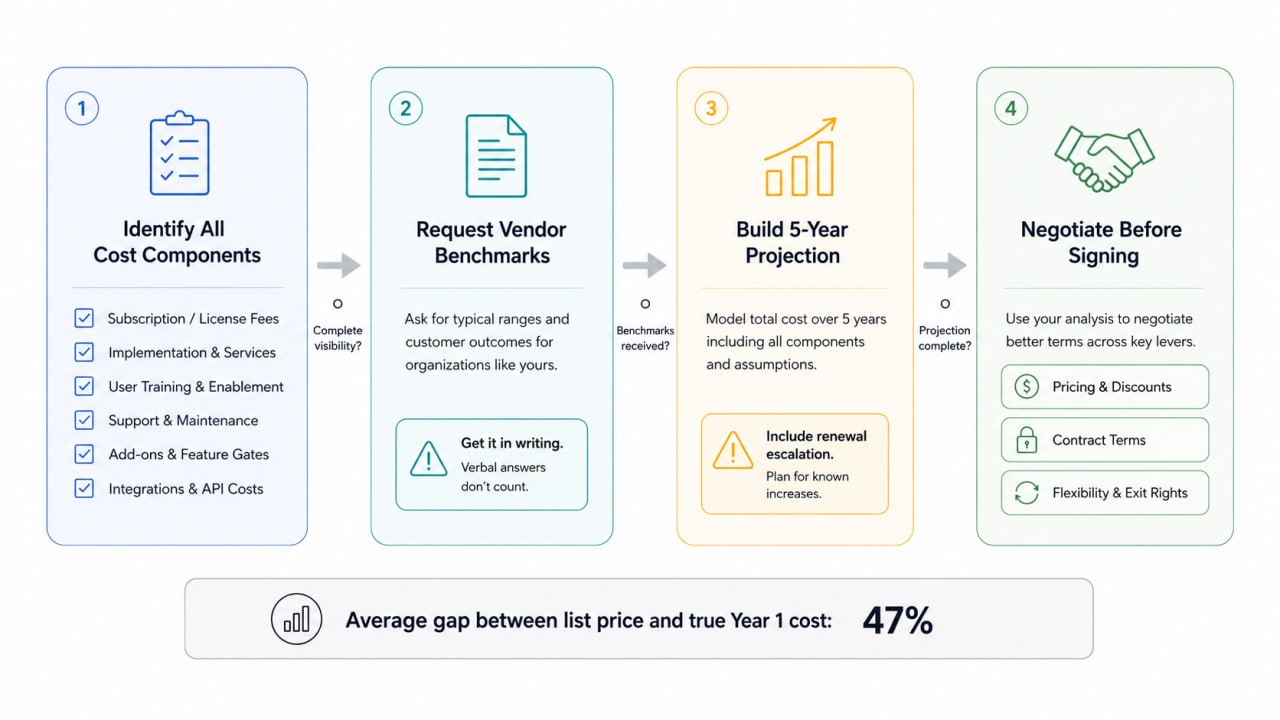 The four-step audit process: identify components, request vendor benchmarks, build 5-year projection, negotiate before signing.
Summary
The True Cost Framework breaks software procurement into six components that, together, determine what a product actually costs:
License fees: Understand the pricing model and its scaling behavior. Negotiate annual and multi-year discounts explicitly.
Implementation: Budget 50 to 200 percent of first-year license cost for enterprise tools. Get implementation cost ranges in writing before signing.
Training: Calculate both vendor training cost and internal labor cost. Budget separately for ongoing enablement.
Premium support: Evaluate whether standard support is acceptable for the criticality of the use case. Negotiate support bundling at contract signing.
Required add-ons: Audit what you need before purchase. Document vendor representations in writing. Calculate add-on cost as a percentage of base subscription.
Integration costs: Build a complete integration map before procurement. Budget for both initial development and ongoing maintenance at 20 percent of build cost per year.
Apply these six components to every significant software purchase. The analysis takes two to four hours and routinely surfaces cost differences of 40 to 80 percent between the list price and the true cost of ownership. That is a worthwhile investment before signing a multi-year enterprise contract.
Pricing data and ranges cited in this article are based on publicly available vendor pricing, aggregated buyer reports from G2, Capterra, TrustRadius, PeerSpot, and StackShare, and community procurement discussions. Figures are representative benchmarks, not guarantees. Actual costs vary by vendor, contract terms, and organizational complexity.
Find the best tool for your use case: real pricing, user ratings, and feature comparisons for 495++ products.
Browse All Categories