
The $2,100 bill nobody planned for
Last month, a developer on Reddit shared a screenshot of their OpenAI invoice. They had picked GPT-4o for a document processing pipeline (seemed like the safe choice) and budgeted $200/month. The actual bill: $2,100. A cheaper model from a different provider would have handled the job at one-tenth the cost. They just never ran the numbers.
This story is not unusual. It is the norm.
Why manual LLM cost calculation fails
Here is what makes LLM pricing genuinely hard to reason about.
Input and output tokens cost different amounts. Most models charge 2x to 5x more for output tokens than input. A summarization task (long input, short output) has a completely different cost profile than a code generation task (short input, long output), even on the same model. If you are not modeling your actual input/output ratio, your estimate is fiction.
Batch and cache pricing changes the math. OpenAI's batch API gives you 50% off. Anthropic's prompt caching can cut input costs by 90% on repeated prefixes. Google offers similar discounts. These are not edge cases -- for production workloads, batch and cache pricing is the real price. But almost nobody factors it in when choosing a model.
Providers update pricing constantly. DeepSeek slashes prices. Anthropic launches a new tier. Google adds a model with a different pricing structure above and below certain context thresholds. Your spreadsheet from two weeks ago is already wrong.
There are 110+ models across 16 providers. OpenAI, Anthropic, Google, DeepSeek, Groq, Mistral, Meta, Cohere, Together, Perplexity, xAI, Fireworks, Replicate, AI21, Cloudflare, Amazon Bedrock. No human keeps this in their head.
Why existing tools do not cut it
You have probably tried one of two things: a spreadsheet or a vendor's own calculator.
Spreadsheets break the moment pricing changes. You build a sheet, share it with the team, and within a month it is stale data dressed up in conditional formatting. Nobody updates it. Everyone trusts it.
Vendor calculators have an obvious problem: OpenAI's calculator shows you OpenAI models. Anthropic's shows you Anthropic models. Nobody's calculator tells you "actually, for this workload, you should use a completely different provider." That is not a flaw: it is the business model.
What was missing was an independent tool that puts every model on the same playing field. That is exactly what we built with the LLM API Pricing Calculator.
What we built and why each feature exists
The LLM API cost calculator covers 110+ models from 16 providers, updated as pricing changes, with no vendor affiliation.
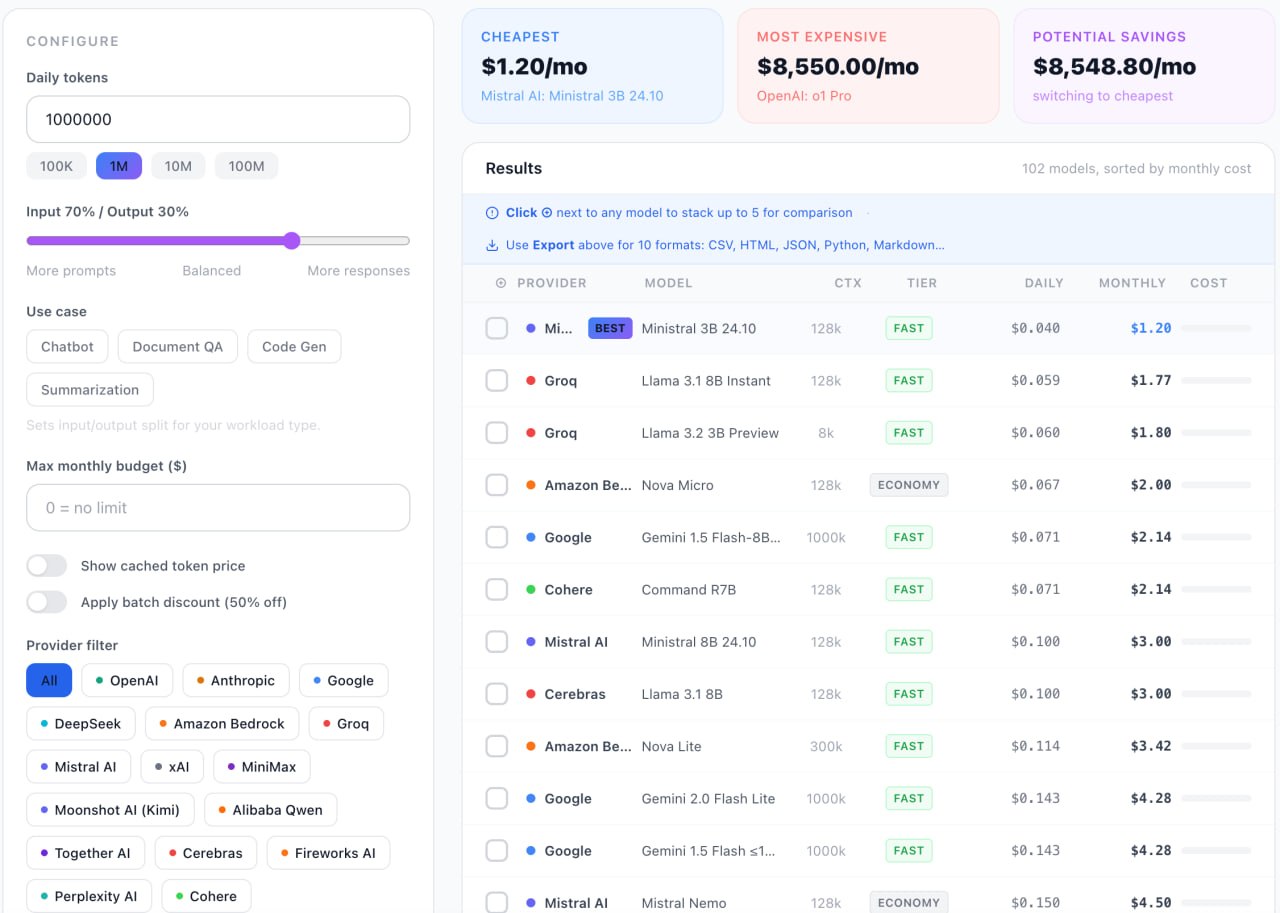
Input/output ratio slider. Drag it to match your actual workload. Summarization? Slide toward heavy input. Code generation? Slide toward heavy output. The cost ranking reshuffles instantly.
Batch discount toggle. One click to see what every model costs with batch pricing applied. For production workloads that can tolerate async processing, this often changes which model wins -- see full LLM pricing comparison.
Cached pricing toggle. If you are sending repeated system prompts or similar prefixes, cache pricing is your real cost. Toggle it on and see which providers reward you for it.
Budget filter. Set a monthly budget. Models that exceed it disappear. Simple, but surprisingly useful when you need to narrow 110+ AI models down to 3 real candidates.
Stack and Compare mode
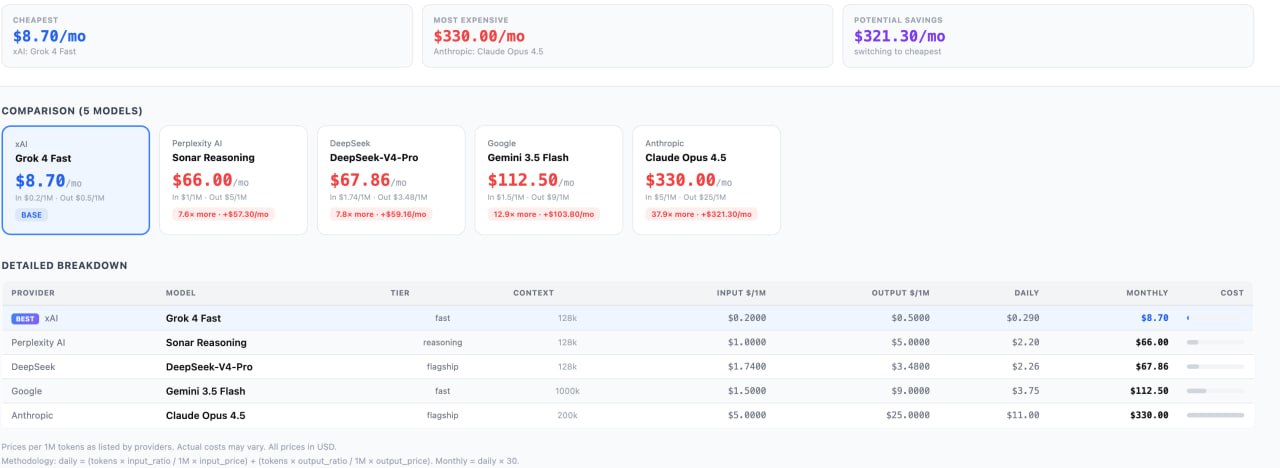
Pick up to 5 models and see them side-by-side: pricing, context window, cost per million tokens for your specific ratio. This is what the final decision actually looks like.
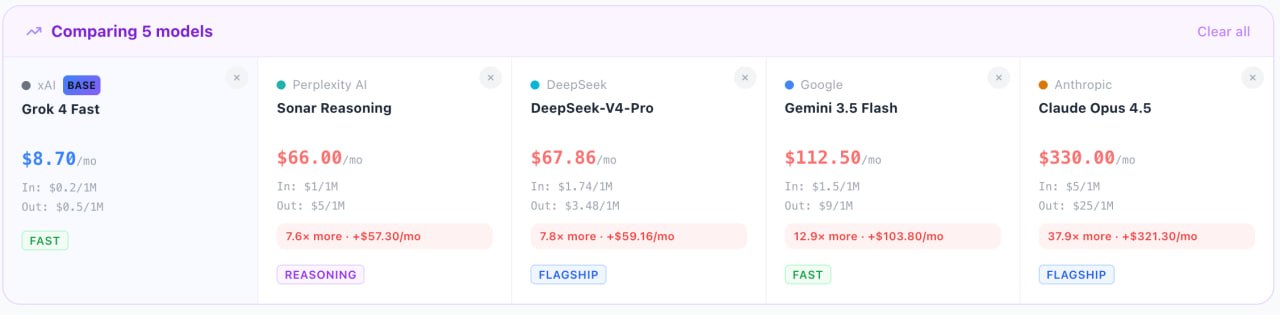
The compare view shows exactly how much more expensive each model is relative to your base choice. When Claude Opus 4.5 is 37.9x more expensive than Grok 4 Fast for the same workload, that number makes the decision concrete.
Why 10 export formats matter
We could have stopped at PDF. But developers do not just need a report; they need the data where they actually work.
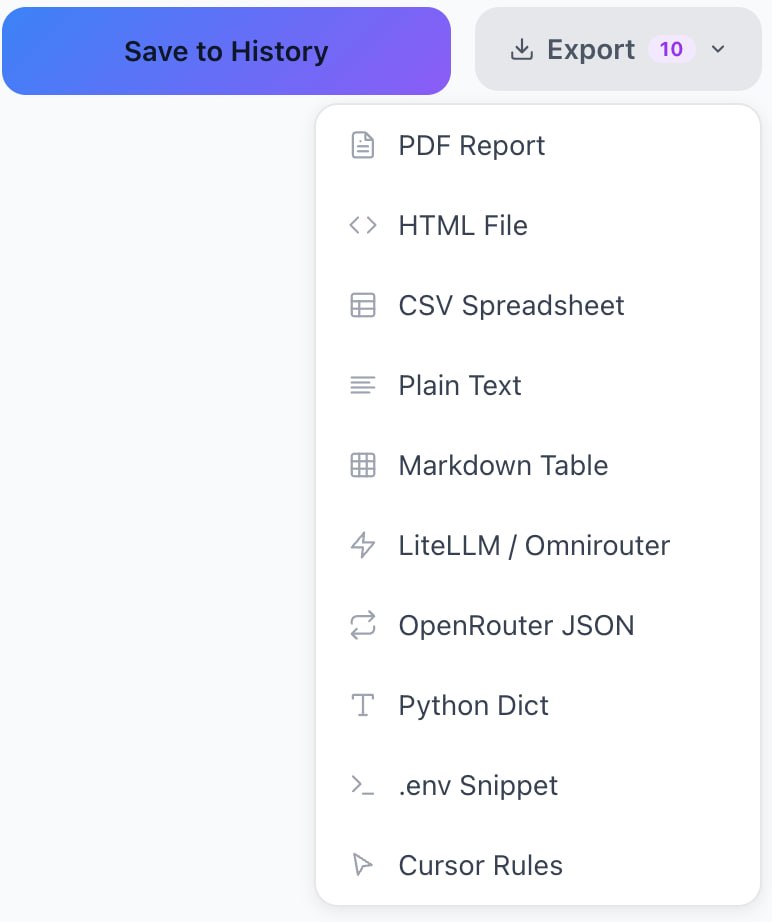
LiteLLM JSON for teams running a proxy layer across multiple providers. Drop it straight into your config. OpenRouter JSON -- same idea, different proxy. Python Dict -- copy-paste into your cost estimation script. Cursor Rules -- if you are using Cursor or another AI-powered IDE, this feeds your model config directly. .env Snippet -- for the "just give me the environment variables" crowd. Plus CSV, Markdown, HTML, Plain Text, and PDF (free, no account needed) for everything else.
The LLM calculator is not a destination. It is a step in your workflow. The output should fit wherever you work next.
What we learned building this
The hardest part was not collecting pricing data. It was deciding what "cost" means. Per-token pricing is the headline number, but real cost depends on context window utilization, retry rates, latency requirements, and whether you can batch. We had to draw a line: the calculator handles what is deterministic (published pricing, ratios, discounts) and flags what is variable.
If you want to go deeper on comparing LLM providers, we track 30+ models across the large language model category with verified pricing, G2 ratings, and feature breakdowns.
What is coming next
We are building a forecasting mode. The idea: take your current usage, apply a growth multiplier, factor in agent overhead (because agentic AI workflows multiply token consumption in non-obvious ways), and apply a Pareto concentration factor for usage distribution across models.
It is the question every engineering manager actually asks: "What will this cost in six months?"
It is not ready yet. Forecasting LLM costs honestly, without just multiplying by a made-up number, turns out to be its own hard problem.
Try the LLM API pricing calculator
The free LLM API pricing calculator is available at comparedge.com/llm-calculator. No account needed for full functionality including PDF export. Save calculation history with a free account, takes 30 seconds.
ComparEdge is an independent SaaS comparison platform: 495+ verified products, no vendor sponsorships, no affiliate bias on rankings.
Find the best tool for your use case: real pricing, user ratings, and feature comparisons for 495++ products.
Browse All Categories